

Autoblog Awards General Motors for their Infotainment Systems

Barry’s Chevrolet is pleased to inform you that the automotive enthusiasts’ site Autoblog has awarded General Motor infotainment systems using the Google Built-in operating system as the best non-luxury infotainment system.
A generation or two ago, infotainment wasn’t a word; if it had been, it could only refer to a radio that had access to news and music stations. Very limited, yet easy to use. You had a volume knob that also turned the system on, a radio station tuning knob, and about five buttons that mechanically pushed the tuner to a preset station. Eventually, the systems added the ability to listen to 8-track or cassette tapes until the player started eating them. A decade later, you could play CDs until the Eject button stopped working. Navigation? It was in the glove box and likely refolded incorrectly.
While few of us want to return to the simple car radio, we want to use our phones safely and play the music we have stored or from streaming services. We want to be shown how to reach a location without stopping and looking at a paper map that only gives you a vague idea of the actual address location. Yet we yearn for simplicity, something that is easy to use and operate.
Some manufacturers accomplish this better than others, and according to Autoblog, several General Motors models now have the best infotainment system among non-luxury brands.

The Google Built-in Advantage
The key ingredient to both GM’s award-winning systems and Volvo’s infotainment system, which won the same award for luxury brands, is Google Built-In. Both GM and Volvo left the electronic interface design to the experts.
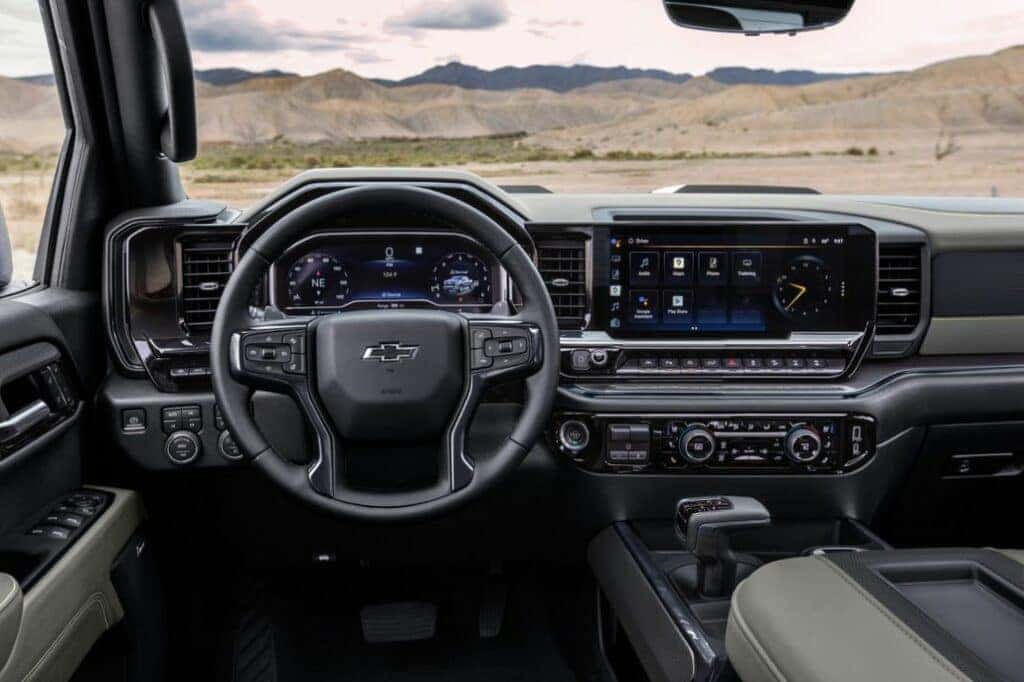
Google Built-in means Google designed the operating system and its interface. Menus are intuitive, apps are easy to access, and just as important, easy to get out of. This also means the world’s most-loved navigation app, Google Maps, is built right into the system, so you don’t need a smartphone connected to use it. With your permission, the system can also tap into your Google account and automatically get set up with your stored addresses and other information. Also included is the Google Assistant voice recognition and command system, which is much more reliable than vehicle voice-command systems of the past.
Explore Google Play
Google Built-in also enables you to download several applicable Google Apps from the Google Play store. Spotify, your favorite internet radio station or podcasting app, and many other apps are all available for your vehicle. You can then operate them either manually or through Google Assistant. The latter is quite handy when selecting one out of hundreds of available music artists.
Ease of Use
Beyond Google Built-In, GM’s interface makes it easy to get around, particularly with permanent or “stickied” controls on the left side of the screen that make it easy to bring up your most used apps. Autoblog put it this way: “The tile interface and split-screen capability makes moving about the system and keeping tabs on multiple things at once a breeze. And just like the Volvo infotainment, we appreciate the continued presence of a hard volume knob and, in some cases, a physical home button that’ll bring you back to square one from anywhere within the system.”
This system is so easy to use that GM intends to drop Apple CarPlay and Android Auto in favor of exclusively using this system. Present GM Google Built-in systems are still compatible with the smartphone mirror systems.
A car’s infotainment system plays a significant part in how you interface with your vehicle, so you may strongly want to consider one regarded as award-winning by the experts. You will find the Google Built-in system in the Silverado and Colorado model lines and the Tahoe and Suburban. Its adoption on other models is on the way. Visit Barry’s Chevrolet and explore the Google Built-in system for yourself.

0 comment(s) so far on Autoblog Awards General Motors for their Infotainment Systems